Simple attendance for youth groups
Forty young people through the door in ten minutes, three leaders, and a clipboard that's already gone walkabout. RollCall gets everyone signed in without slowing the night down — and shows you who didn't turn up.
Free for groups up to 30 members · no card needed · no app to download
What a youth night actually looks like
Doors open. A group arrives together, someone's already through to the games, two more come in halfway through worship, and a young person you've never met is standing at the door with a mate.
Meanwhile someone has to hold the pen. That person spends the first twenty minutes of the night doing admin instead of talking to anyone — and by the end of the term the sheets are in a drawer and nobody could tell you who came regularly and who quietly stopped showing up.
Attendance shouldn't be the thing you spend your night managing. The point of taking a roll is knowing your young people, not filling in a form.
How RollCall handles it
They check themselves in
A tablet or laptop by the door. They type their name, tap to confirm, and they're in — with duplicate protection so nobody signs in twice.
New people register at the door
Someone new can add themselves in under a minute and go straight through, and their details land in your records with everyone else's.
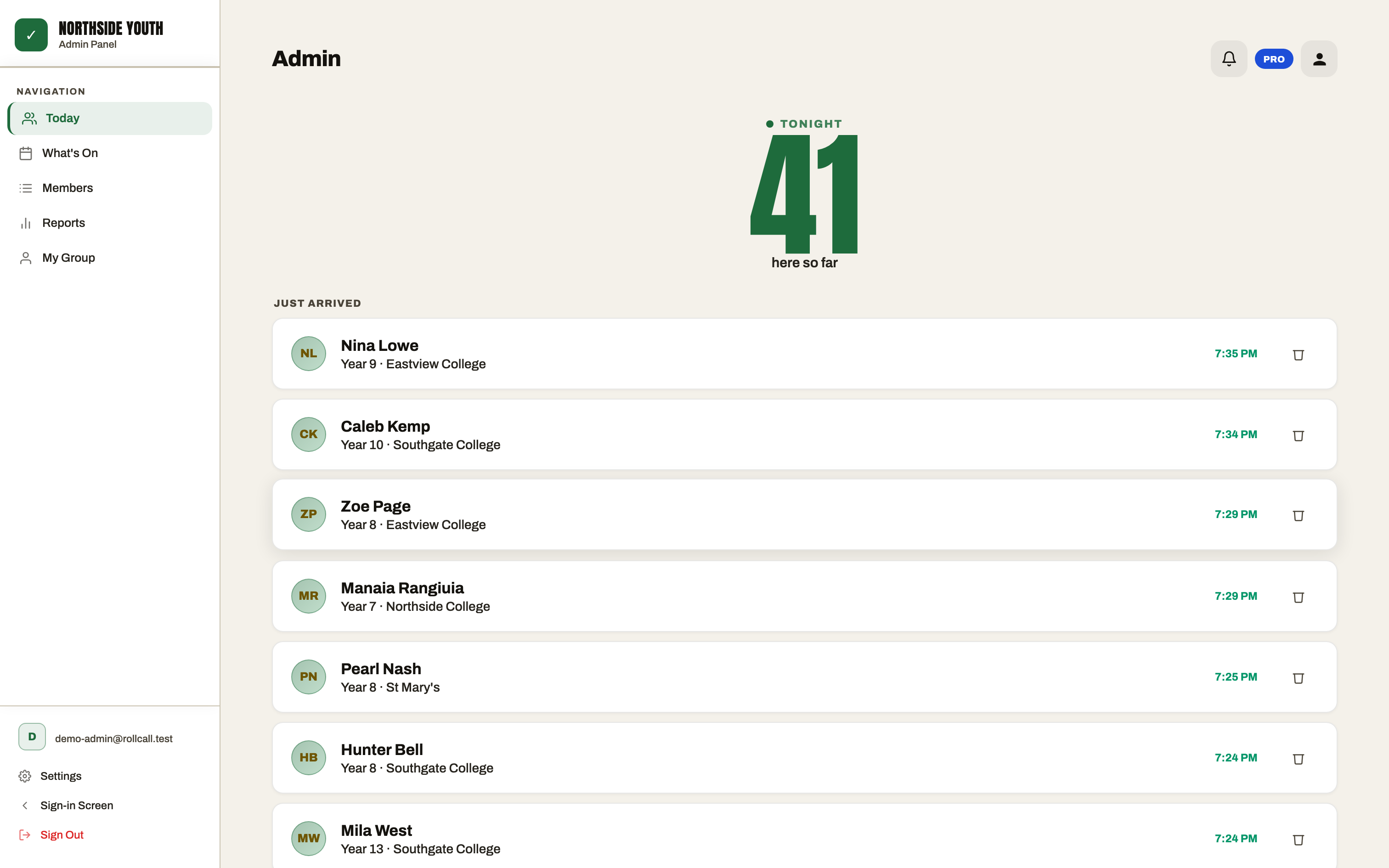
Leaders see the room
A live count and a feed of who's arrived, so you know who's here without counting heads across a dark hall.
And when they leave
Knowing who arrived is half of it. On a night where young people come and go — someone gets picked up early, a group heads off after games — the question a leader actually gets asked is whether someone is still in the building.
Turn on Member Sign-Out and they sign themselves out on the way past the same device they checked in on: type their name, tap it, press Sign Me Out. Your leader view then splits into who's still on site and who's gone home, and each person's record keeps both times, so you can see how long they were there.
It's off by default and set per group, so if your nights don't work that way, nothing changes. It's on every plan, including Free.
The bit that matters most: who's missing
Tonight's number is the easy part. The valuable thing is what builds up over a term — who's here every week, who's new, and who came for a month and then stopped.
That's the young person worth a text on Saturday morning, and they're almost impossible to spot on paper.
Keep the details you actually need
Each young person has a profile: year level, school, phone, an emergency contact, and any custom fields your group cares about — allergies, consent forms, whatever you already track on paper.
It's visible to your group's authorised leaders and nobody else. Every group's data sits in its own isolated space, stored in Sydney and operated from New Zealand under the Privacy Act 2020. The privacy policy spells out exactly what's collected and how to get it back or delete it.
Set up before your next session
- Create your group and add your young people — type them in, or import a CSV if you already have a list.
- Put any device by the door: a tablet, an old laptop, a phone. It runs in the browser, and you can add it to the home screen so it opens full-screen like an app.
- Give your leaders a PIN login to their own group so they can see their people, and only their people.
Nothing to install from an app store, and young people never need accounts or passwords.
Common questions
Do young people need to create an account?
No. They just type their name on the check-in device at the door. No accounts, no passwords, no app to download.
What if someone new turns up mid-term?
They tap "New here? Register", add their details in under a minute and they're checked in. Their profile is created at the same time, so there's nothing to type up later.
Can two leaders check people in at once?
Yes — open RollCall on more than one device and everything syncs. Brief wifi dropouts are fine; check-ins sync when the connection comes back.
Can we tell who has already left for the night?
Yes, if you turn on Member Sign-Out for your group. Young people sign themselves out on the same check-in device as they leave, and leaders see who's still on site versus who's gone home, with the time each person left. It's off by default and available on every plan.
Make Friday night easier
Try RollCall at your next session and see how much of the night you get back.
Free for groups up to 30 members · no card needed · cancel anytime