Children's ministry and Sunday school attendance
Know which kids are in each class, keep parents' emergency contacts a tap away, and build a record of who came, without a clipboard. RollCall is an attendance tool, so this page is also upfront about what it doesn't do.
Free for groups up to 30 members · no card needed · no app to download
First, be clear about which job you need done
"Kids' check-in" means two different things in churches, and it's worth separating them before choosing software:
Attendance records
Which children came to which class, who's new, who's stopped coming, and how to reach a parent. RollCall does this.
Secure check-in and pickup
Printed name tags with allergy alerts, matching parent pickup labels or codes, and verifying that each child goes home with an approved adult. RollCall doesn't do this.
If your child-safety policy requires secure pickup, use a dedicated children's check-in system or keep a supervised handover process. Planning Center Check-Ins and KidCheck are two widely used options in the US. RollCall fits churches whose classes need a reliable roster and follow-up, often smaller Sunday schools, midweek programs and Wednesday-night kids' clubs, or as the attendance record alongside your existing pickup process.
How it works on a Sunday morning
Check in at the classroom door
A tablet at the door: a parent or the child taps the child's name, or a teacher checks the class in from their own phone. No accounts and nothing to download.
Visiting families register once
A parent fills in the child's details, their own phone number, an emergency contact and any fields you add, such as allergies or photo permission, and the child is checked in.
Teachers see their class
On Pro, each class can be its own group, with teachers who sign in with a PIN and see just their children: who's here, who's new and who's been away.
See every child who's here
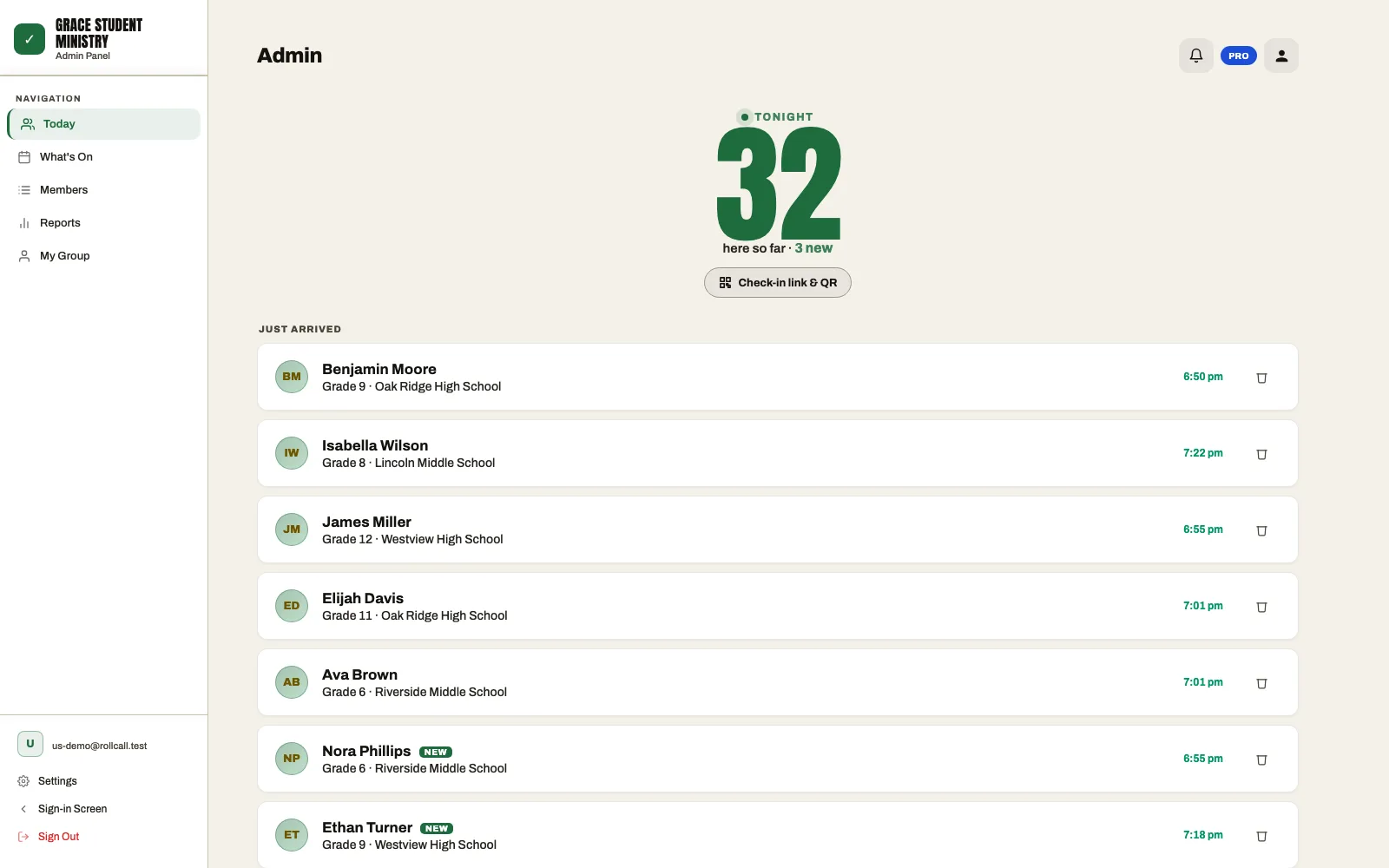
As children are checked in, leaders see the count and each name in real time, with grade and first-timers marked new so a visiting family gets a proper welcome.
Emergency contacts when you need them
Every child's profile holds a parent's phone number and an emergency contact. Leaders can open a child's profile from the live attendance list, and the Contact Details report lists members' and emergency contacts' phone numbers and emails for everyone in one place, ready to copy.
If you turn on optional sign-out, each record also keeps the time a child left. That's a self-service record of departure, not a verified handover, so treat it as information, not as a pickup process.
Noticing families who've drifted
A child missing from Sunday school is often the first sign that a family is going through something. RollCall's Members list filters to children who've missed two or four weeks in a row, and each session lists that week's first-timers, so a teacher or children's director can send a short "we've missed you" to the parent while it still feels natural.
Things to know before you start
- One record per child per day. RollCall records each person once per day across your organization. A child at Sunday school and a later children's program on the same day counts once.
- Separate ministries, separate organizations. If your children's ministry and youth group need fully separate attendance, run each as its own RollCall organization.
- Who sees children's information. Only your authorized leaders. Each church's data is isolated from every other organization's, and nothing is sold or used for advertising. See the privacy policy.
Common questions
Does RollCall print name tags or pickup labels?
No. RollCall records attendance and keeps parents' contact details on hand, but it doesn't print labels or match pickup codes. If you need those, use a dedicated children's check-in system or keep your supervised pickup process alongside RollCall.
Can parents check their children in?
Yes. A parent can tap their child's name on the tablet at the classroom door, or scan your QR code and check in from their own phone. Visiting families can register their child on the spot.
Can each Sunday school class have its own teachers?
On Pro, yes. Each class can be a group with its own teachers, who sign in with a PIN and see only their class. Your children's director sees everyone.
Can we track allergies and medical notes?
Yes. Add custom fields for anything you need, such as allergies, medical notes or photo permission. They're filled in at registration and visible to your authorized leaders.
How much does it cost?
RollCall is free for groups of up to 30 people, with no card needed and no time limit. Larger groups use Pro at US$9.99/month (a launch price; standard $19.99), which includes 150 people and starts with a 14-day free trial.
A roster that keeps itself
Set up a class in a few minutes and try it this Sunday.
Free for groups up to 30 members · no card needed · cancel anytime