Free for groups of up to 30 members — no card needed. · See pricing →
Built for youth groups · check-in & attendance

Who's here.
Who's missing.

Weekly check-in and attendance for youth groups — churches, sports clubs and community groups use it too. No complicated setup: young people just type their name, nothing to download, and leaders get a live view of who's actually in the building.

See how it works
Free forever for groups of up to 30 members — no card needed
No app to download · no spreadsheets · no complicated setup
Built in Christchurch, New Zealand
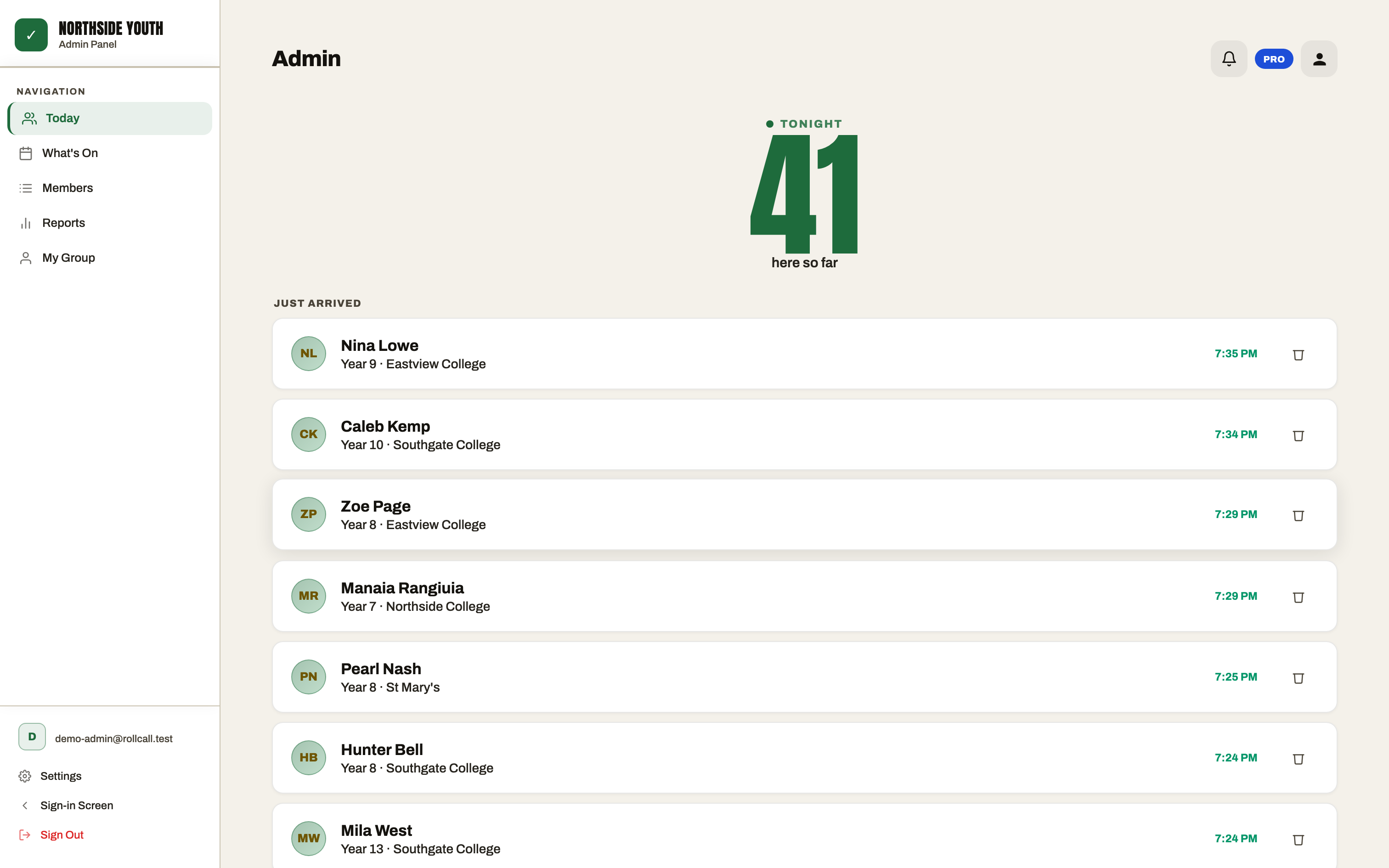
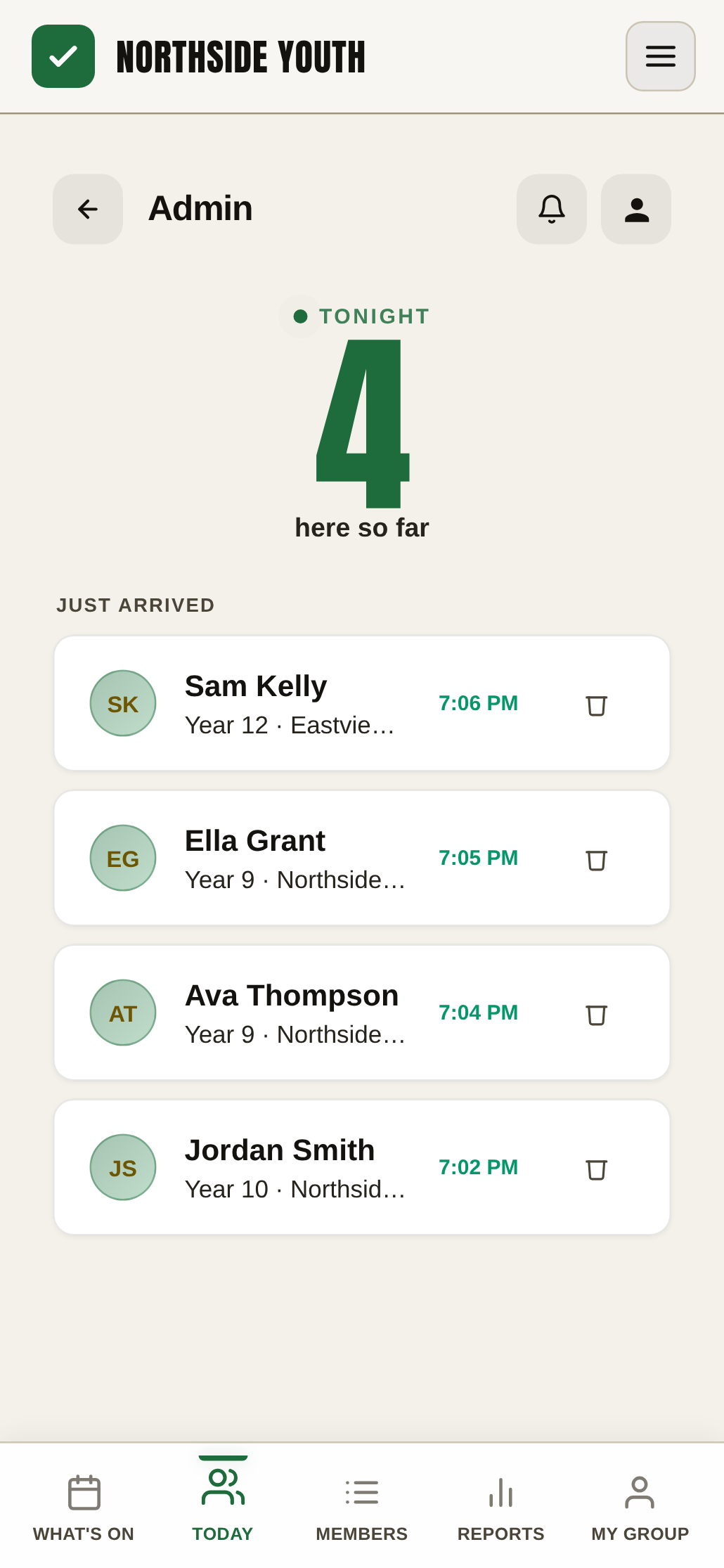
The RollCall leader view: tonight's live count and who has just arrived
Accurate attendance is a duty-of-care record: when someone checks in, your leaders know exactly who's in the building.
Built for Youth groups Churches Sports clubs Community groups
How it works

Built for the moment everyone arrives at once

The doors open and everyone turns up together. They arrive, type their name, they're in — and you see who's here. No app to download, no accounts: check-in runs in the browser on any tablet, laptop or phone you already have.

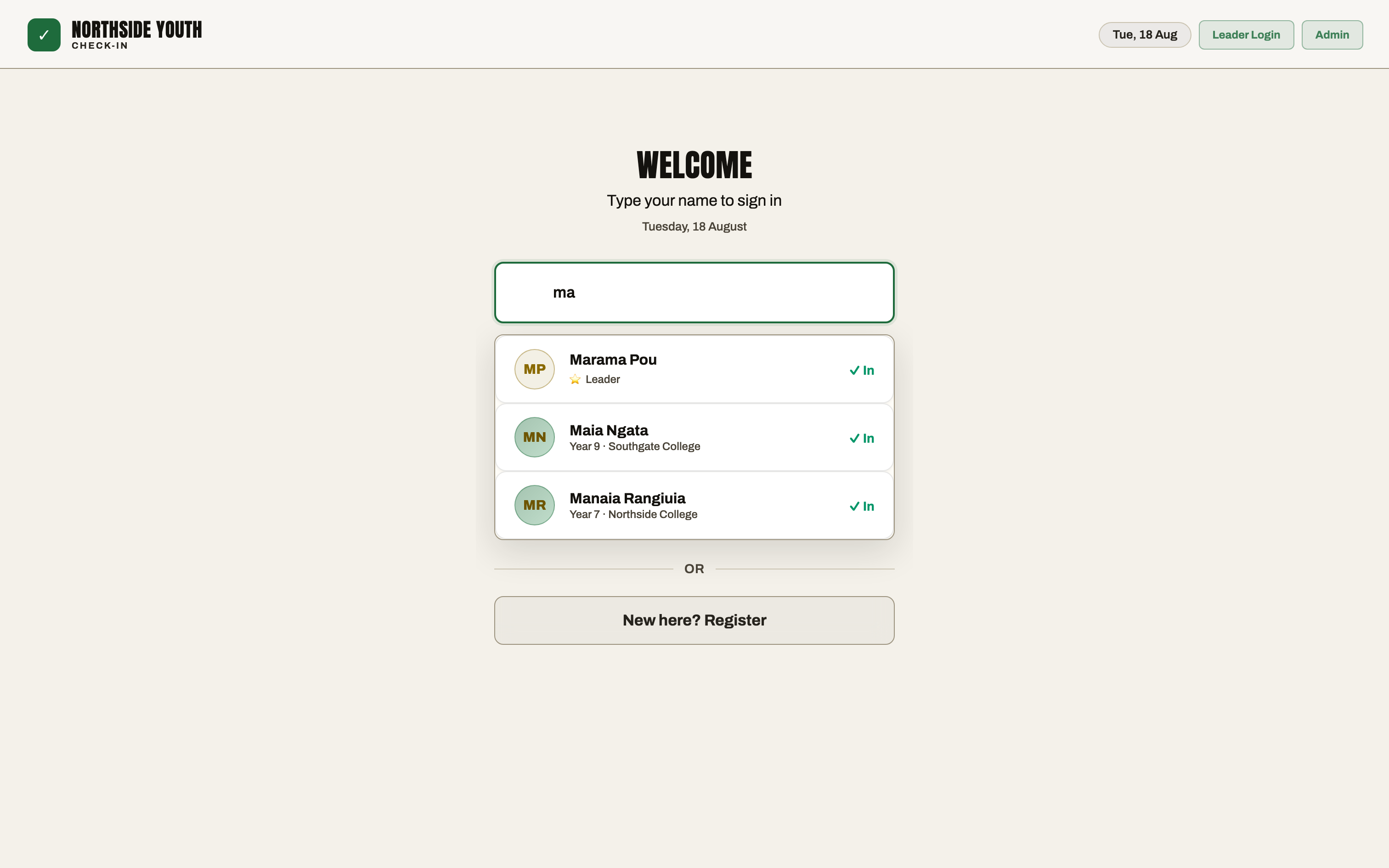
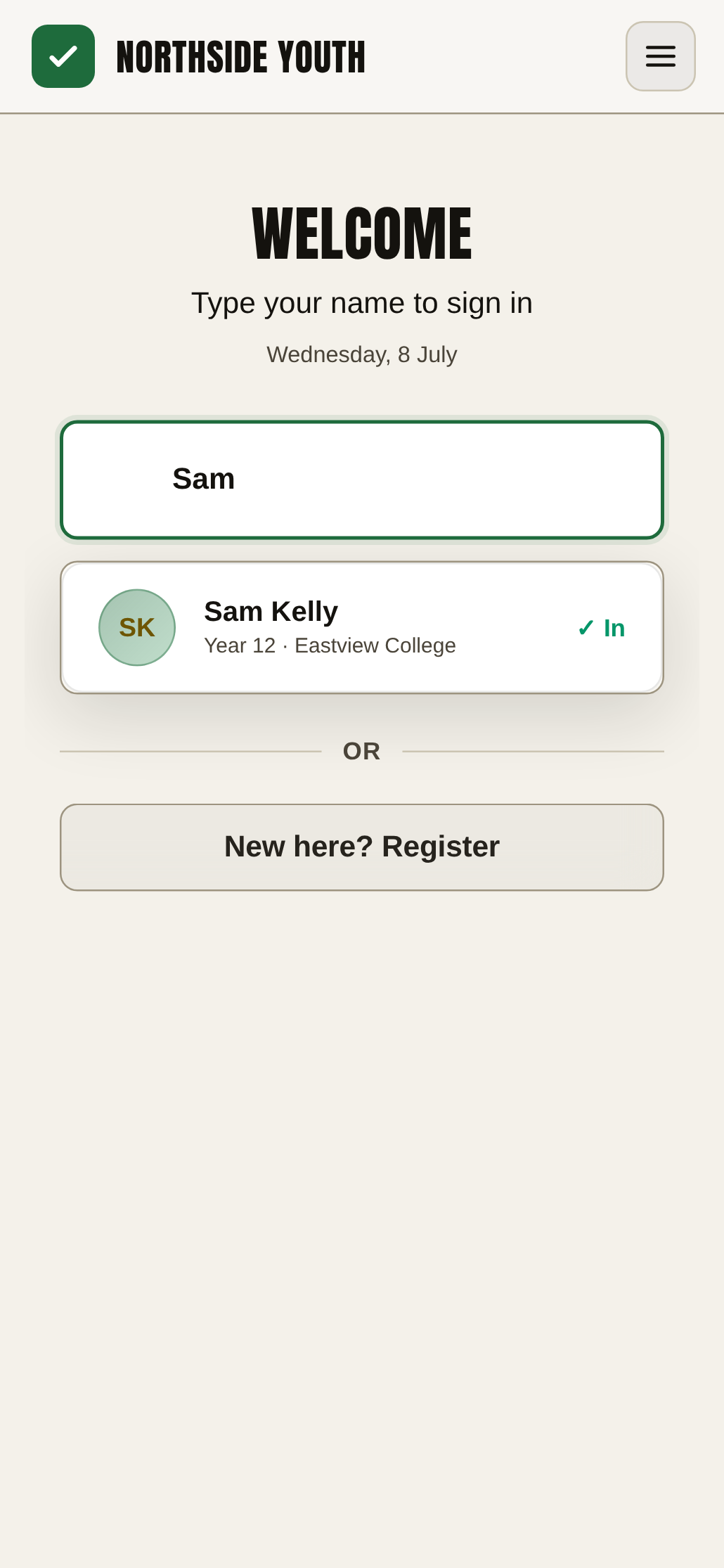
The RollCall check-in screen, with matching names appearing as a member types
01 — They type their name
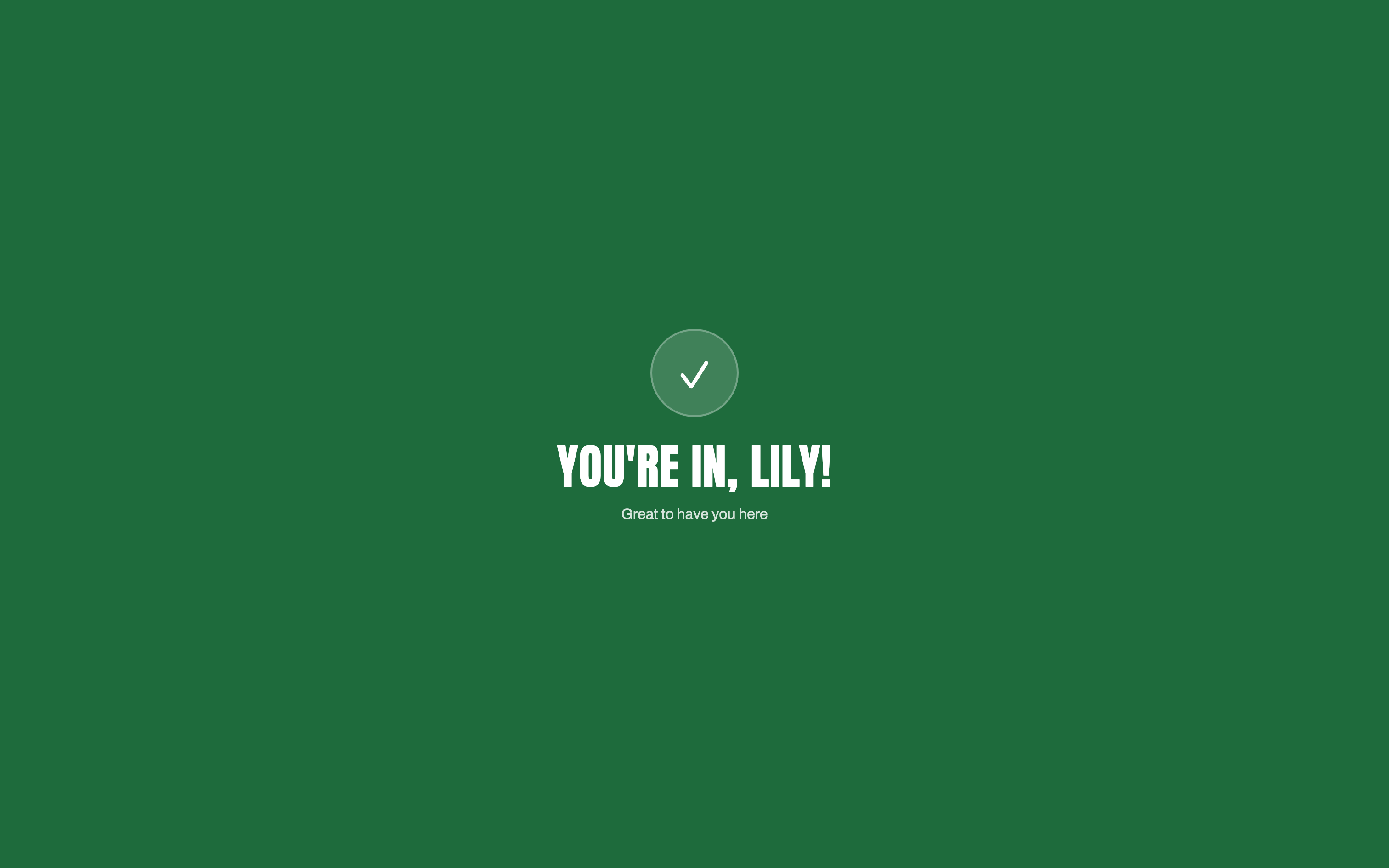
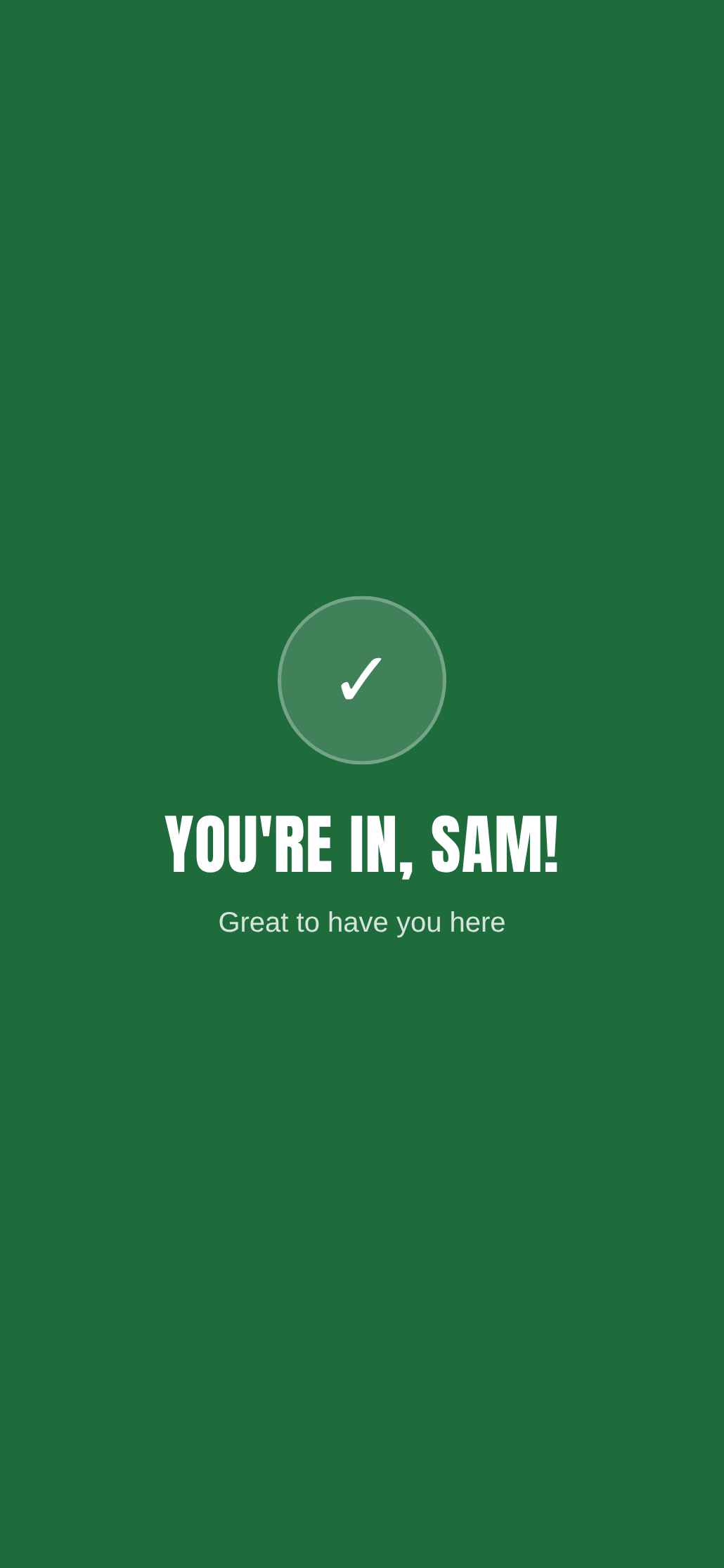
RollCall fullscreen you're in confirmation after a member checks in, with a three week streak
02 — You're in
RollCall leader dashboard showing who's checked in tonight and when each member arrived
03 — You see who's here

Less time checking people in. More time with people.

The problem

Attendance shouldn't be the thing you spend your night managing

Someone arrives, and you go looking for the sheet. They can't find their name, so it gets written somewhere else. Someone forgets to sign in at all. And later, someone has to type it all into Excel and make sense of it.

Before RollCall
  • Paper attendance sheets
  • Names missed or forgotten
  • Typing it all into Excel or Google Sheets later
  • Attendance scattered across sheets, files and tabs
  • No record of who left early
  • Hard to see patterns over time
With RollCall
  • People check themselves in
  • Attendance recorded automatically
  • A live view of who's there
  • New people register at the door
  • Members sign out when they leave
  • Your whole attendance history in one place

One screen. Everyone accounted for.

New people

Someone new? No problem

New people shouldn't need a separate process. With RollCall they register when they arrive, and their details go straight into your group's records alongside everyone else's.

No paper forms. No forgotten names. No re-entering information later.

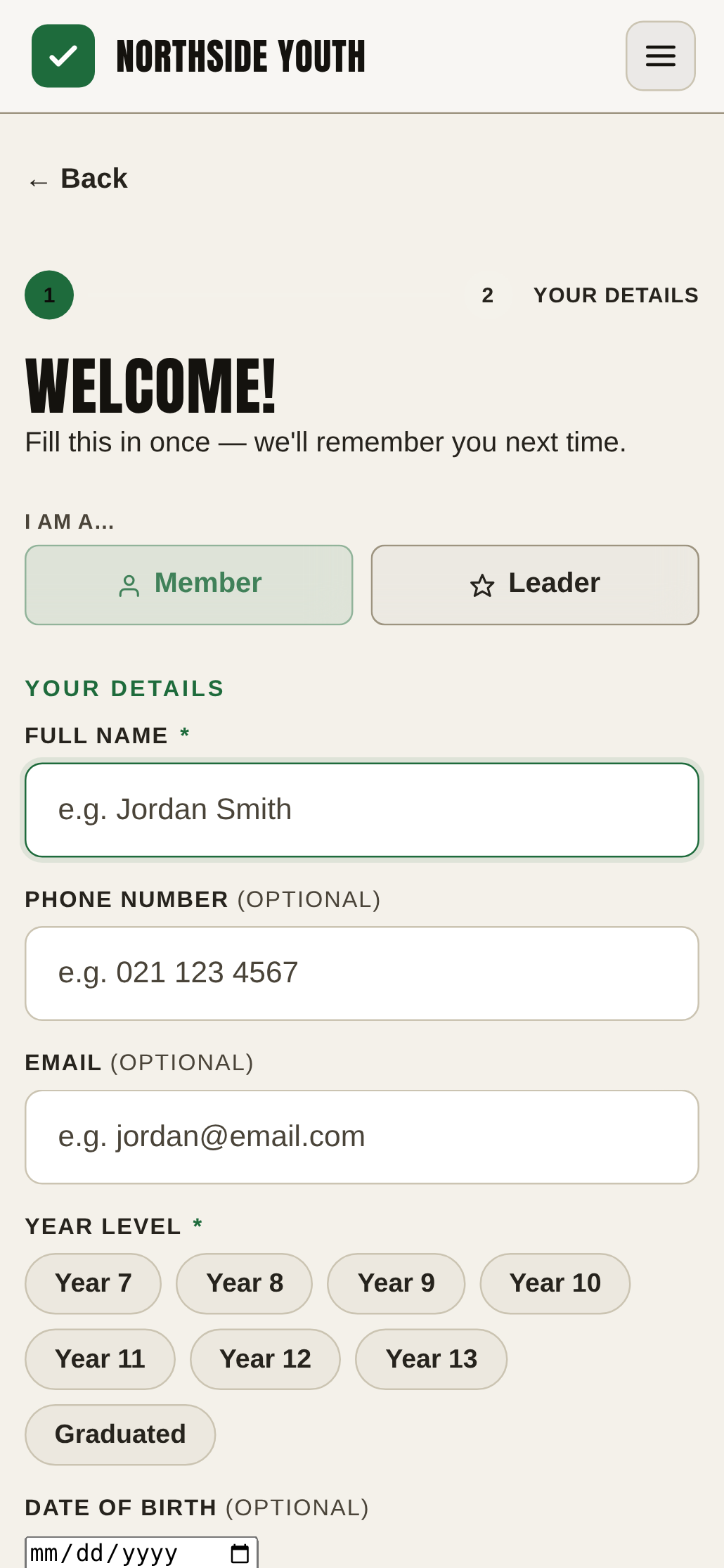
The RollCall new-member registration screen, filled in at the door
Attendance history

Know more than who's here tonight

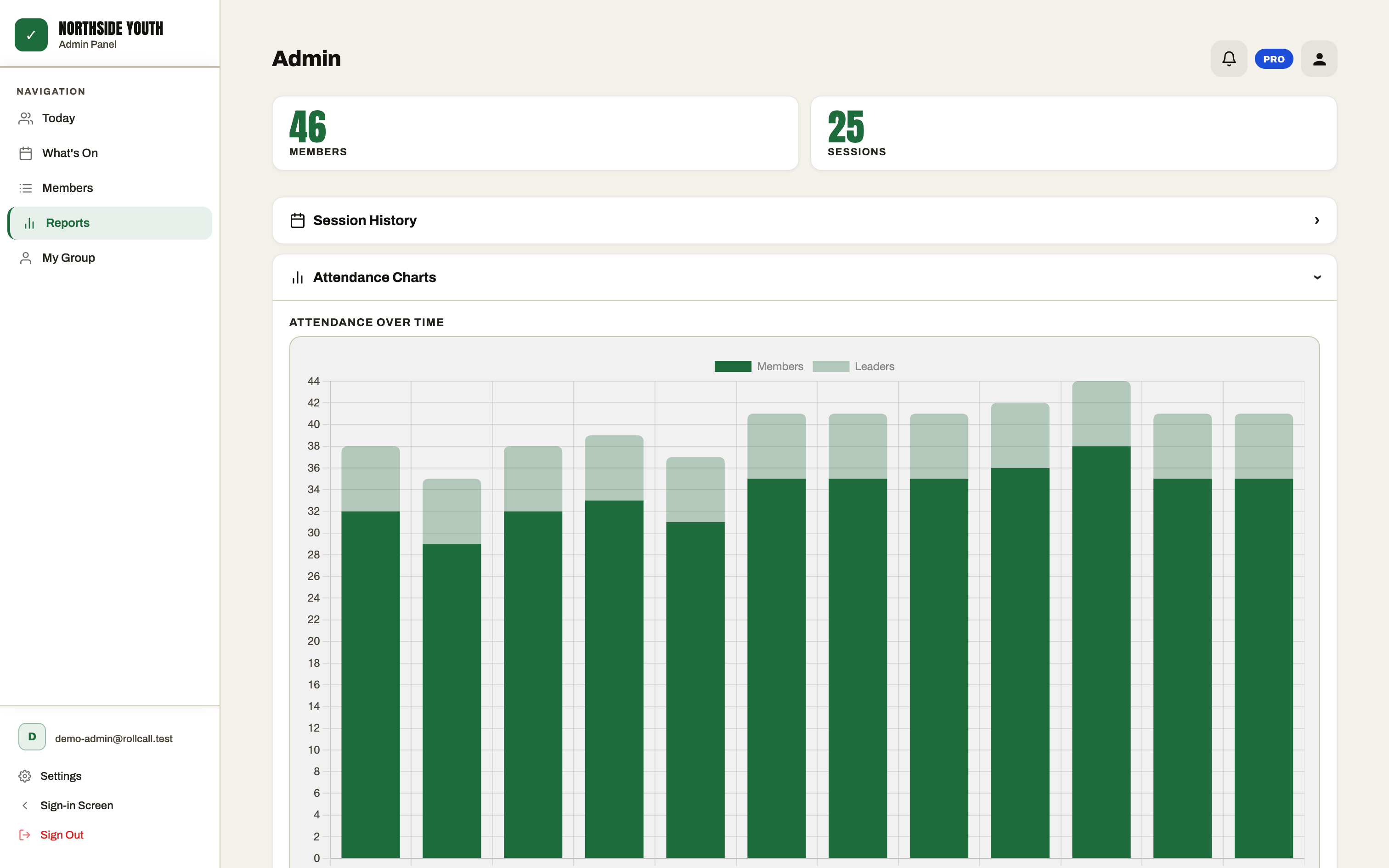
Tonight's attendance tells you who's in the room. Your attendance history tells you what's happening over time — who's coming consistently, who's new, and who's quietly dropping off.

Because sometimes the most important person isn't the one who walked through the door. It's the one who didn't.

RollCall reports on a laptop: attendance over time, with members and leaders stacked per session
What you get

Everything a leader needs. Nothing they don't.

Fast check-in

People check themselves in — no queue, no paperwork, duplicate-proof.

Live attendance

See who's checked in right now, at a glance.

Member sign-out

Turn it on and members sign themselves out as they leave — so you know who's still on site, and how long they stayed.

Attendance history

Every session kept — spot regulars, new faces and who's drifting.

Reports & exports

Useful numbers and charts, with CSV export when you need it.

Check-in QR & link

Show your group's QR on screen, share the link, or print a poster for the door — people scan and check in on their own phone.

Planning Center

Already using Planning Center? Connect your existing people information and keep the tools you know.

Plus member profiles, leader portals, at-the-door registration and custom fields — and on Pro: session planner, streaks, email reports and your own colours & wording.

Planning Center

Already on Planning Center?
You don't have to replace it.

Keep Planning Center as your system of record — RollCall handles the door. Connect them and your people import straight across, names stay in sync, and your Check-Ins history comes with you. New people who register at the door can be added back to Planning Center with a tap.

How the integration works
  • People sync both ways — never merged on a name guess
  • Attendance history imports from Planning Center
  • Connect with Planning Center's own sign-in; disconnect anytime
Explore the platform

See RollCall in action

Everything you need to check people in, understand attendance, manage your group and stay prepared — all in one simple platform. Pick an area and have a look around.

Know who's here

A live count and arrivals as they happen — not a tally at the end of the night.

The RollCall leader dashboard: tonight's live count and who has just arrived

All screens shown with fictional sample data. Member details and emergency contacts are only visible to your group's authorised leaders — RollCall supports the safety processes your organisation already has.

From the founder

I've been on the other side of the clipboard

Hi, I'm Ephraim — the founder of RollCall. I've spent a lot of time working with young people, volunteers and leaders, and I've seen firsthand how something as simple as attendance becomes a surprisingly big admin job. Someone finds the sheet. Someone makes sure everyone's on it. Someone eventually has to turn it into something useful.

So I built RollCall to make that whole process simpler. It's built around one idea: leaders should spend less time managing attendance — and more time with their people.

I'm based in Christchurch, New Zealand, and I'm building RollCall alongside the groups that use it. In these early days, support comes straight from me.

Ephraim Stocks · Founder, RollCall
Have a question? Talk to me
Founder-led support
Free
for groups of up to 30 members — no card needed

Seconds
for a member to check themselves in

Want to see it before you try it?
Book a demo with the founder
Privacy & security

Your group's information matters

RollCall is built for organisations managing real people and real attendance records — often including young people. That information is treated with care.

Established infrastructure

Your group's data is hosted on Google Cloud (Firebase) and stored in Sydney, Australia.

Every group walled off

Each group's data sits in its own isolated space, enforced by database security rules — no other organisation can reach it.

No advertising, ever

Your members' information is never sold or used for advertising, and the RollCall app your group signs into carries no advertising trackers.

Your data is yours

View, export and delete your group's information whenever you want — it belongs to your group, not to us.

Encrypted connections

Data travels over HTTPS and is encrypted at rest on Google Cloud, and every device must be signed in before it can read anything.

Built in New Zealand

Independently built and operated from Christchurch, under the NZ Privacy Act 2020.

Read our privacy policy
Pricing

Simple pricing.
No surprises.

Free for groups of up to 30 members — no card, no time limit. Pro starts with a 14-day free trial: you'll add a card at checkout, but nothing is charged until the trial ends.

Free · No card needed
RollCall Free
For groups of up to 30 members.
$0— free forever
No card, no trial clock — just free
  • Up to 30 members · one group · unlimited leaders
  • Full check-in screen + kiosk mode
  • Optional member sign-out
  • Leader portals & member profiles
  • Session history + CSV export & import
  • Email support
Pro · Most popular
RollCall Pro
For bigger groups — and groups that are growing.
$19.99$9.99/mo USD
Launch price · 14-day free trial · cancel anytime
  • Everything in Free, plus:
  • 150 members included, then $9.99 per extra 50 · unlimited groups
  • Full reports & attendance analytics
  • Session planner & activities bank
  • Streak tracking + your colours & wording
  • Email reports & priority support

Free covers up to 30 members, free forever. Pro is $9.99/mo (or $107.89/yr — save 10% billed yearly) and starts with a 14-day free trial, cancel anytime.

$9.99/mo is our launch price — Pro's standard price is $19.99/mo, and the launch price won't last forever. We'll always email at least 30 days before any price change, and a change never applies to a period you've already paid for.

Prices in USD. Free covers up to 30 members — no card, no time limit. Pro includes 150 members, then $9.99 per extra 50 members — billed automatically as your group grows. On Pro your card is added at Stripe checkout; nothing is charged during the 14-day trial, and you can cancel anytime from inside the app.

FAQ

Questions groups ask

How much does RollCall cost?

RollCall is free for groups of up to 30 members — no card, no time limit. Pro is $9.99/mo — a discounted launch price on the standard $19.99/mo — with 150 members included, then $9.99 per extra 50 as you grow, and starts with a 14-day free trial. Save 10% billed yearly. If the launch price ever changes, subscribers get at least 30 days' notice by email.

Can I try RollCall before paying?

Yes — groups of up to 30 members can use RollCall free, forever, with no card at all. Pro starts with a 14-day free trial: you'll add a card at Stripe checkout, but nothing is charged until the trial ends, and you can cancel any time before then from inside the app.

Can I cancel at any time?

Yes, any time — there's a cancel button right in the app (Settings → Subscription), no email or phone call needed. You keep everything you've paid for until the end of your billing period, and your data stays safe if you come back.

Can people check in with a QR code?

Yes. Open “Check-in link & QR” from your Today screen, the avatar menu or Settings: your group’s QR appears on screen, and you can copy the link, share it, or print a poster for the door. Whoever scans it lands straight on check-in in their phone’s browser — they type their name and they’re in. It’s on every plan, including Free.

Can members sign out when they leave?

Yes, if you want them to. Member Sign-Out is a setting you turn on per group (it's off by default, so nothing changes unless you enable it). With it on, someone who's already checked in types their name on the same check-in screen, taps it and presses Sign Me Out. Their attendance record gets a departure time — they still count as present — and leaders see who's still on site versus who's gone home, with how long each person stayed. It's on every plan, including Free.

Do members need to download an app?

No. RollCall runs in the browser on any phone, tablet or laptop — nothing to install from an app store, and members don't need accounts. They just type their name on the check-in device at the door.

How does check-in work at a youth group or church?

Put any device on kiosk mode at the door — no login needed. A member types their name, matches appear as they type, they tap to confirm and get a fullscreen "you're in" — with duplicate protection built in. It's designed to be quick and self-service, even when everyone arrives at once.

Is RollCall only for youth groups?

No. RollCall grew out of years of working with youth groups, but it's built for any organisation that needs a simple way to manage check-in and attendance — churches, sports clubs, community organisations, events and programmes.

Does RollCall integrate with Planning Center?

Yes. RollCall can connect with Planning Center, so organisations already using it can bring their existing people information into RollCall's check-in and attendance system — keep the tools you know, and make attendance faster and easier.

How do I add RollCall to my home screen?

Open your group's RollCall link in the browser, then: on an iPhone or iPad, tap the Share button in Safari (the square with an arrow) and choose Add to Home Screen. On Android, tap the ⋮ menu in Chrome and choose Add to Home screen (or Install app). RollCall now opens full-screen from its own icon like a normal app — perfect for the check-in device at the door, and it keeps working even when the wifi drops.

What happens if our internet goes down?

Brief dropouts are fine — the check-in device keeps working and check-ins sync automatically when the connection comes back. Adding RollCall to the device's home screen gives you the most reliable offline behaviour. For a longer outage, keep a simple pen-and-paper fallback handy, as with any online tool.

Can leaders see who's missing, not just who's here?

Yes — that's the point. Leaders open their portal (a PIN login scoped to their own group) and see who's here tonight, who's a regular, who's quietly drifting away and who's brand new, with attendance charts over time.

Is our members' data private?

Each group's data lives in its own isolated space — only your own leaders can see your people. RollCall is operated from New Zealand under the Privacy Act 2020, your members' information is never sold or used for advertising, and you can export or delete your group's data. See the privacy policy for the full picture.
Get started

Make check-in
the easy part.

Give RollCall a try at your next session and see how much simpler attendance can be.

Book a demo with the founder

Know who's here. Notice who's missing.