A check-in kiosk your group runs itself
Put any device by the door, open your group's link, and people check themselves in by typing their name. No app to download, no accounts, no passwords — built for the moment everyone arrives at once.
Free for groups up to 30 members · no card needed · no app to download
What "kiosk mode" means in RollCall
Your group gets its own web address. Open it on any tablet, laptop or phone, add it to the home screen so it runs full-screen, and leave the device at the door — that's the kiosk. Nobody logs into it, and there's nothing to install from an app store.
Someone arrives, types the first letters of their name, taps it in the matches, and gets a fullscreen "you're in". Duplicate protection is built in, so nobody ends up signed in twice — even when the queue is three deep and everyone's talking.
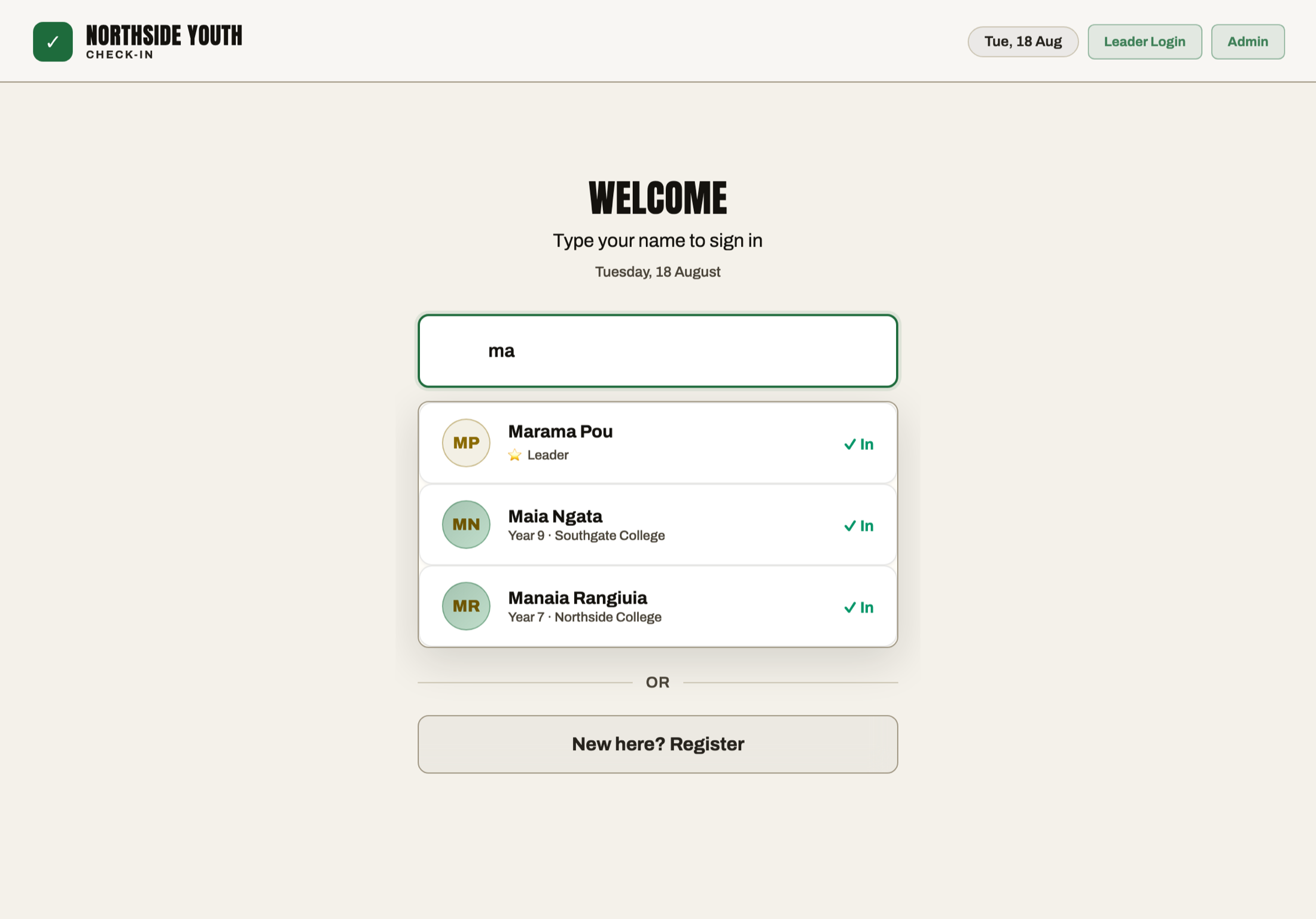
No app. No accounts. No passwords.
The people checking in never sign up for anything. Only leaders and admins have logins — members just type their name. That one decision removes the whole pile of problems that kill door flow: forgotten passwords, app-store downloads on a slow connection, "it wants my email", and the person at the back giving up.
It also means the devices don't matter. A spare tablet, the laptop you already bring, a leader's phone — anything with a browser is a kiosk. Nothing to buy, nothing to maintain.
Check in from a QR code
Because check-in is just your group's web address, a QR code works beautifully. Open Check-in link & QR — it's on your Today screen, in the avatar menu, and in Settings — and you get the QR on screen, big enough to scan straight off the laptop, with the link written out underneath.
From there you can copy the link, share it to a group chat, or print a poster for the door with your group's name, the QR and the link for anyone who can't scan.
Whoever scans it lands straight on check-in — on their own phone, no app, no account — types their name and they're in. Plenty of groups run both: a tablet on the desk for most people, the QR on the wall for the ones who walk straight past it.
Someone new? They register themselves
First-timers don't need a leader with a clipboard. A new person taps "register", fills in their own details on the kiosk or their own phone — name, contact, emergency contact — and goes straight into your records alongside everyone else. No paper form, no re-typing it later, and the person entering their own details first go is friendlier than a leader demanding them at the door.
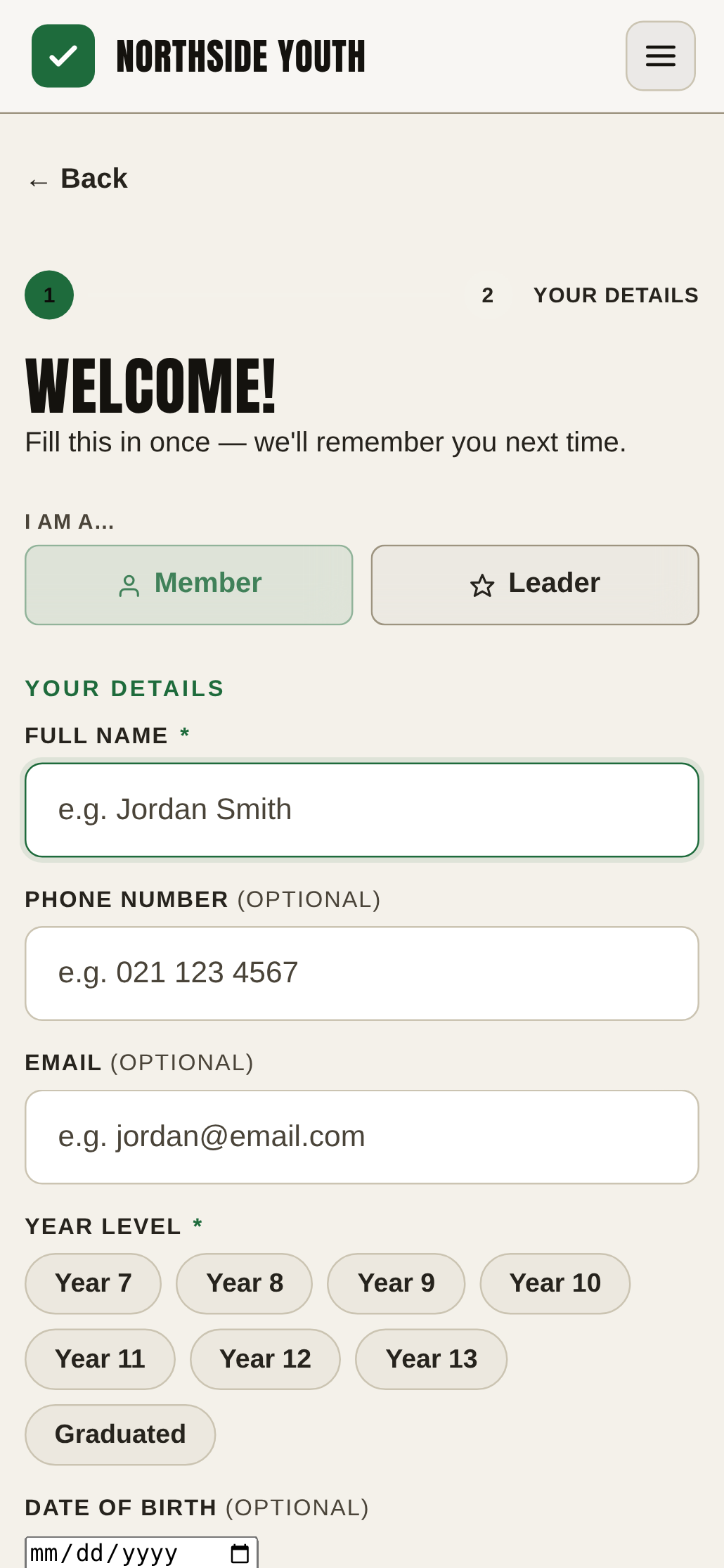
Built for the arrival rush
- Search-as-you-type — two or three letters is usually enough to find a name in a list of hundreds.
- Live view for leaders — while the kiosk takes care of the door, leaders watch the count climb and see exactly who's in.
- Keeps working when the wifi drops — check-ins carry on and sync when the connection comes back. Church halls and school gyms are not known for their signal.
- History that keeps itself — every session is recorded automatically, so the kiosk isn't just a door tool; it's how your attendance records stay complete.
- Sign-out on the way past, if you want it — switch on Member Sign-Out and the same kiosk handles people leaving: they type their name, tap it, press Sign Me Out. Leaders then see who's still on site, and each record keeps the time in, the time out and the time on site. Off by default, on every plan.
What it costs
Everything on this page is on the free plan — kiosk mode included. RollCall is free forever for groups of up to 30 members, no card, no trial clock. Bigger groups use Pro at $9.99/month (150 members included, 14-day free trial). See pricing.
Common questions
Do we need special kiosk hardware?
No. Any tablet, laptop or phone with a web browser is the kiosk — open your group's link and put the device by the door. Add it to the home screen and it runs full-screen like a purpose-built kiosk.
Do members need to download an app or create an account?
No, and they never will. Members type their name on the check-in screen — no app, no account, no password. Only leaders and admins have logins.
Can people check in with a QR code?
Yes. Open "Check-in link & QR" from your Today screen, the avatar menu or Settings: the QR appears on screen, and you can copy the link, share it, or print a poster for the door. Scanning it opens check-in in the phone's browser — they type their name and they're in. It's on every plan, including Free.
What happens when someone new arrives?
They register themselves, on the kiosk or their own phone — name, contact details and emergency contact in one short form — and appear in your records immediately. No paper form, no typing it up later.
Does the kiosk keep working if the wifi drops?
Yes. Check-ins keep working through connection dropouts and sync when the network comes back — so a flaky hall connection doesn't stop the door.
Can the same kiosk handle people signing out?
Yes, once you turn on Member Sign-Out for your group — it's off by default. Someone already checked in types their name on the same screen, taps it and presses Sign Me Out. It adds a departure time to their existing attendance record rather than creating a second one, so they still count as present, and leaders can see who's still on site. It's on every plan, including Free.
Is the kiosk free?
Yes — kiosk mode, self-registration and attendance history are all on the free plan, which covers groups of up to 30 members forever with no card. Larger groups need Pro at $9.99/month, which starts with a 14-day free trial.
Put a kiosk on the door this week
Create your group, open your link on a tablet, and let people check themselves in — free for groups up to 30 members.
Free for groups up to 30 members · no card needed · cancel anytime