Attendance tracking for small churches
In a church of 60, you notice when someone's missing, until the weeks get busy and you don't. RollCall gives a small church a simple check-in and an honest record of who's been coming, without adopting a full church management system.
Free for groups up to 30 members · no card needed · no app to download
You may not need a full church management system yet
Church management software is built to run a whole church's administration: giving, scheduling, events, communication and a people database for several staff. If you're a pastor with a part-time administrator and a team of volunteers, much of that goes unused, and someone still has to set it up and keep it tidy.
What most small churches actually need from attendance is simpler: know who came, notice who's stopped coming, and have numbers ready when the board or denomination asks. That's what RollCall does.
What it looks like in a small church
One tablet by the door
People tap their name as they arrive, or scan a QR code with their own phone. Guests add their own details. No app, no accounts, no volunteer with a clipboard.
A list of who's missing
Filter to anyone who's missed two or four weeks in a row. In a small church, that list is usually short, and every name on it matters.
Numbers when you need them
Session history and totals for every service or meeting, exportable to CSV for your annual report.
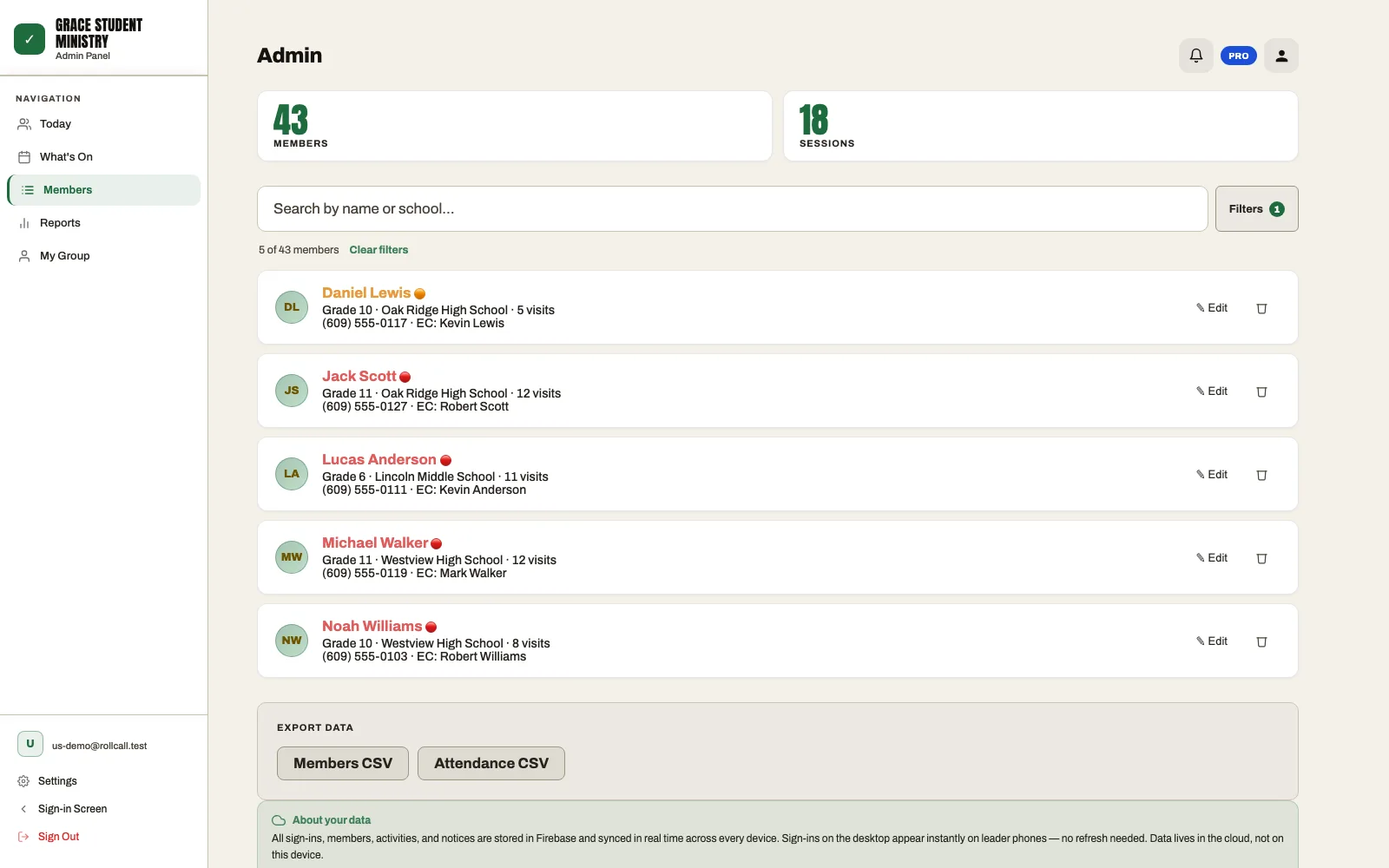
Who's missing, at a glance
The Members list filtered to Missed 2+: everyone who's missed two or more weeks in a row, with their phone and emergency contact right there for a quick call or text.
Set up by one volunteer, in one afternoon
- Create your church's RollCall and choose your check-in link.
- Import your people from a spreadsheet (CSV), or type them in.
- Open the link on a tablet or an old laptop by the door.
- Run it alongside your paper sheet for one Sunday, then retire the paper.
There's no contract and no setup fee, and you can export your data to CSV at any time.
What it costs
RollCall is free for up to 30 people, with no card and no time limit. That covers a small group, a youth group or a Sunday school class. A church tracking more than 30 people uses Pro at US$9.99/month (a launch price; standard $19.99), which includes 150 people and starts with a 14-day free trial. Above 150, it's $9.99 per extra 50 people. See pricing for the details.
When a spreadsheet is still the right answer
If one person takes attendance for one group and reliably types it up each week, a spreadsheet works fine. We've made a free church attendance template that flags who's missed two or more weeks. Software starts to pay off when more than one leader is involved, when guests are frequent, or when the typing-up keeps slipping.
What RollCall doesn't do
It doesn't handle giving, volunteer scheduling, event registration or printed children's security labels. If you need those in one system, a church management system is the better choice, and RollCall can still run alongside it for a single ministry. If you already use Planning Center, RollCall can import your people and check-in history.
Common questions
Is RollCall free for small churches?
It's free for up to 30 people, with no card needed and no time limit. If you're tracking more than 30 people, Pro is US$9.99/month (launch price) for up to 150 people, with a 14-day free trial.
Do we need a church management system to track attendance?
No. A church management system makes sense if you also need giving, scheduling and events in one place. For attendance and follow-up alone, a simple tool like RollCall, or even a spreadsheet, is often enough for a small church.
Do we have to check in every adult on Sunday?
No. Many small churches check in individually where it helps most, such as kids, youth and small groups, and keep a simple headcount for the main service. Others check in everyone because the list of who's missing is the point. Either works.
What do we need to get started?
Any device with a web browser: a tablet, a laptop or a phone. There's nothing to install. If you have a list of members in a spreadsheet, you can import it as a CSV.
Notice every name
Set up your church in an afternoon and try it this Sunday.
Free for groups up to 30 members · no card needed · cancel anytime